




Small business owners don’t lose sleep over “innovation”, they lose it over inbox fires, scheduling chaos, repeat questions, and processes held together by optimism. The operational challenges pile up fast, and hiring another person for every new task isn’t a strategy; it’s a slow-motion budget leak. Artificial intelligence adoption is becoming the practical way to keep service quality high without burning out the team, using service automation where it counts and customer experience enhancement where it matters. The payoff is simple: more capacity, cleaner operations, and a business that runs like it has extra hands.
Understanding AI Without the Sci‑Fi Baggage
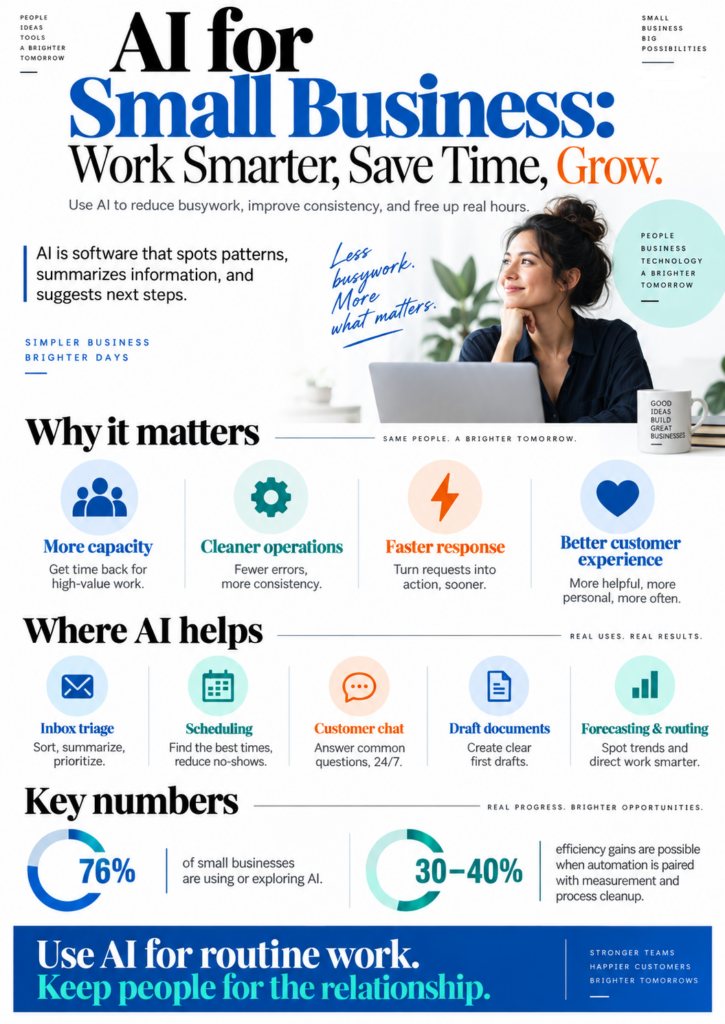
Artificial intelligence is software that spots patterns and makes useful predictions or suggestions. In most service businesses, that “brain” is machine learning, systems trained on examples so they can classify emails, forecast demand, summarize notes, or draft replies.
This matters because AI can take the first pass at work that drains attention, then hand your team a cleaner, faster decision. With 76 percent of small businesses already using or exploring AI, the advantage often comes from removing friction, not building futuristic gadgets.
Think of AI like a tireless assistant who reads every request, sorts it, and suggests the next best step. It can route tickets, propose schedules, and power customer chat that answers common questions consistently, backed by AI in at least one business function. With the basics clear, it helps to build the skills to choose safer, smarter implementations.
Build CS Foundations That Make AI Decisions Less Guessy
Once you understand that “AI” is mostly math, data, and pattern-spotting (not robot vibes), the next step is making sure your team can judge it without crossing fingers. Earning a computer science degree can give small business owners and staff a solid foundation in how AI systems work, what algorithms do, how models learn from data, and why data management isn’t just “put it in a spreadsheet and hope.”
With that grounding, you’re better equipped to make informed calls when selecting AI tools, implementing them into real operations, and optimizing them over time so they actually match your goals instead of derailing them. The bonus is you don’t need to become a full-time engineer; you need enough understanding to ask smarter questions, spot risks earlier, and steer decisions with confidence. If you want a structured path that fits around running a business, an accredited online degree in computer science can make it easier to learn while you work.
Use These 7 AI Plays to Save Time and Still Feel Human
AI is great at busywork and terrible at being you. Use it like a power tool: keep your hands on the steering wheel, and let the robots sand the edges.
- Map your workflow like a programmer (then automate the boring parts): Pick one repeatable process, new lead intake, invoicing, appointment scheduling, and draw the steps as a simple flowchart. Mark any step that’s copy/paste, data transfer, or “send the same email again,” then automate only those with AI-powered automation tools. This is where workflow optimization pays off: you remove friction without changing what makes your business human.
- Build a “voice + facts” response library for customer service: Create 20–30 reusable response templates for common requests (shipping updates, refunds, reschedules, “what’s your pricing?”). Store two ingredients in each: your brand voice (tone, phrases you actually say) and a facts block (policies, links, hours). Have AI draft replies by pulling from the library, then require a 10-second human pass for names, context, and empathy, because “Sorry for your inconvenience” is how trust goes to die.
- Turn customer messages into structured data (so you can act on them): Set up a daily or twice-weekly routine where AI summarizes inbound emails/chats into a spreadsheet: issue type, urgency, customer tier, promised follow-up date. This is data literacy in the real world: you’re labeling inputs and creating clean fields your team can sort and filter. Bonus: it becomes training data for better routing rules and fewer dropped balls.
- Use AI as a first-draft operator for proposals, invoices, and SOPs: Give AI a rigid outline (sections, bullet limits, required terms) and a sample of your best past doc, then ask it to produce a draft. Your job is to verify assumptions and numbers, intermediate CS thinking means you don’t trust outputs you can’t test. In practice, you’ll go from “blank page panic” to “edit-and-send” in 15 minutes.
- Create a “personalization layer” instead of a chatbot personality: Don’t ask AI to “be friendly.” Ask it to use specific customer signals: last purchase, industry, location, support history, and the exact next best action you want. Example: an email that references the customer’s last order and offers one relevant add-on, not a buffet of everything you sell. This keeps personalized customer service real, and makes your competitive advantage with AI feel like competence, not cosplay.
- Automate lead follow-up with guardrails and a human handoff: Use AI to score leads based on clear criteria you define (budget fit, urgency, decision-maker, product match), then trigger a sequence: day 0 confirmation, day 2 helpful resource, day 5 check-in. Set a rule that any reply, pricing question, or “not sure” routes to a human within one business day. You save time and avoid the classic small-business mistake of “we followed up… eventually.”
- Run a monthly “cost-cut + quality check” sprint: Pick one metric to improve (time-to-reply, quote turnaround, no-show rate) and one cost to reduce (admin hours, rework, refunds). Track before/after in a simple dashboard and keep what works; delete what doesn’t. Some teams see efficiency improve by 30 to 40 percent when automation is paired with measurement and process cleanup, not when they sprinkle AI dust on chaos.
AI for Small Business: Common Questions Answered
Q: What’s an “ethical” way to use AI with customers?
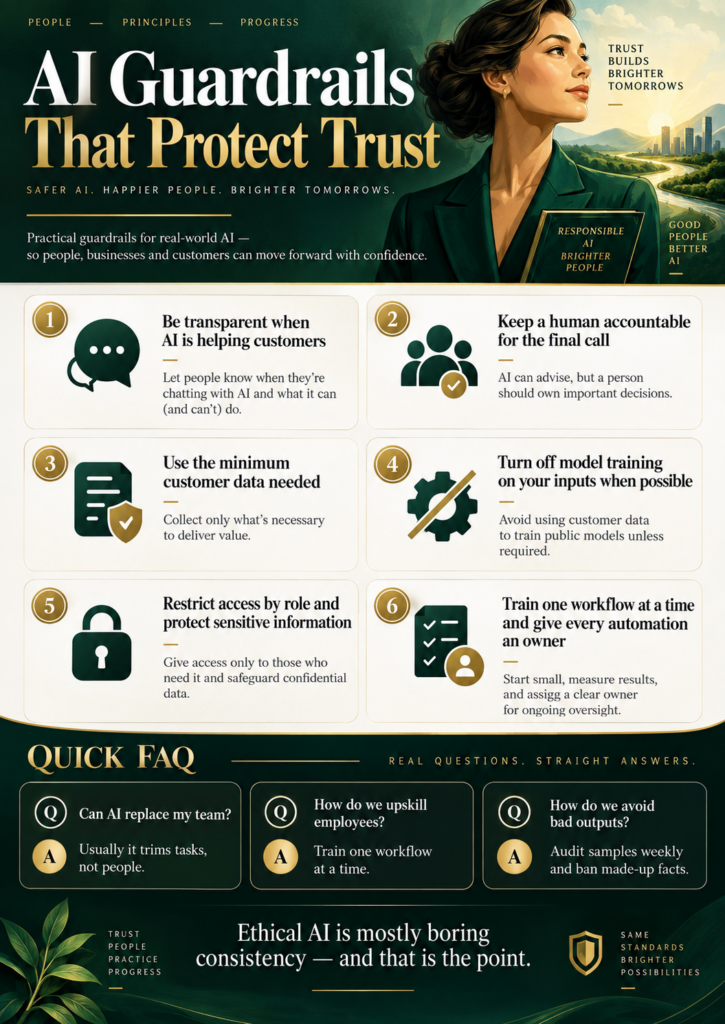
A: Tell people when AI is helping, especially in support or marketing, and keep a human accountable for the final call. Set rules like “no made-up facts” and “no pressure tactics,” then audit a handful of outputs weekly. Ethical AI is mostly boring consistency, which is exactly the point.
Q: How do I protect customer data when using AI tools?
A: Start by classifying what’s sensitive: payment info, IDs, health details, and anything you’d hate to see on a billboard. Use the minimum data needed, turn off training on your inputs when possible, and restrict access by role. If a tool can’t explain where data goes, it doesn’t get invited back.
Q: Can AI replace my team, or will it just change their jobs?
A: For most small businesses, AI trims tasks, not humans, but anxiety is real since AI-related job displacement doubled year-over-year. Be explicit about what will be automated and what new skills will be rewarded, then put it in writing.
Q: How should I upskill employees without overwhelming them?
A: Train one workflow at a time and make it practical: a 30-minute demo, a cheat sheet, and a weekly “show me your best prompt” swap. Assign an owner for each automation, like you would for inventory or scheduling. If nobody owns it, it becomes digital clutter.
Make AI Do the Boring Work Without Losing Your Humanity
Most small businesses want the time savings of AI without turning into a weird robot factory or risking customer trust. The smarter path is small business innovation with guardrails: ethical technology adoption, clear boundaries on data, and AI used to support (not replace) judgment and relationships. Do that, and AI becomes a growth enabler that improves consistency, frees up real hours, and supports sustainable business growth while maintaining personal touch. Use AI for the routine, and keep people for the relationship.